

Brighten Your Smile with the AI Teeth Whitening Photo Editor
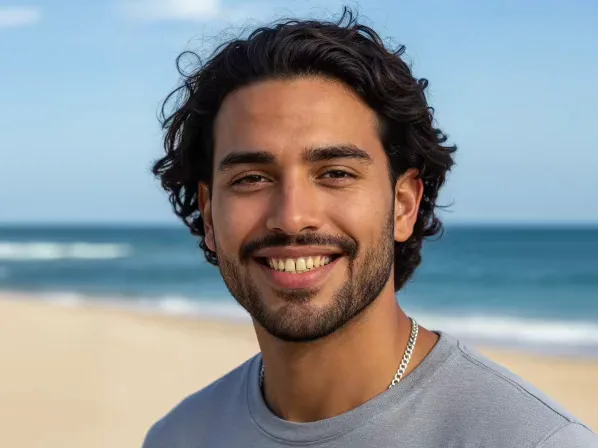
Yellowing or stains can make you hesitant to share your smile. Facelab's teeth whitening photo editor restores its natural brightness in seconds. Instead of bleaching the whole mouth, the AI detects only your teeth for a clean, healthy effect. With our teeth whitening app you skip pricey dental treatments and still look your best. Adjust the intensity from a subtle cleanup to a dazzling Hollywood smile.
Explore more Facelab tools
AI Make Up Editor
Apply virtual lipstick, eyeshadow, and blush instantly.
Open Tool →AI Hairstyle
Try any hairstyle and color — from subtle to bold.
Open Tool →Object Remover
Erase unwanted objects from photos with AI precision.
Open Tool →Photo Expander
Expand any photo with AI-generated edges in seconds.
Open Tool →Background Remover
Remove any background in seconds with AI precision.
Open Tool →Watermark Remover
Erase watermarks and logos from any image instantly.
Open Tool →AI LinkedIn Headshot
Generate professional headshots from any selfie.
Open Tool →Clothes AI Editor
Swap outfits and try new styles with AI.
Open Tool →AI Teeth Whitening
Brighten your smile with realistic whitening in one tap.
Open Tool →Eye Color AI Editor
Change eye color naturally — any shade, any photo.
Open Tool →AI Shadow Remover
Remove harsh shadows from photos automatically.
Open Tool →Image Upscaler
Enlarge photos up to 4× without losing quality.
Open Tool →Body Editor
Slim, reshape, or adjust body proportions with AI tools.
Open Tool →Skin Retouch
Smooth skin, reduce blemishes, perfect your complexion.
Open Tool →Face Shape Editor
Subtly reshape facial features with natural precision.
Open Tool →AI Profile Photo Editor
Turn any selfie into a stunning profile picture.
Open Tool →Resizing Image
Resize photos to any size without quality loss.
Open Tool →Instagram AI Photo Editor
Edit photos for Instagram with one tap AI presets.
Open Tool →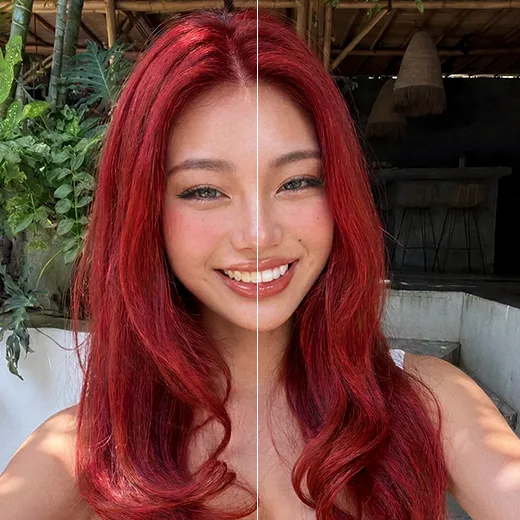
How to Whiten Teeth in Photos Naturally
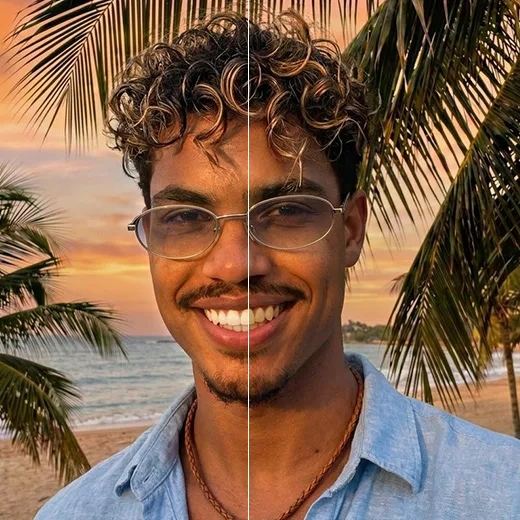
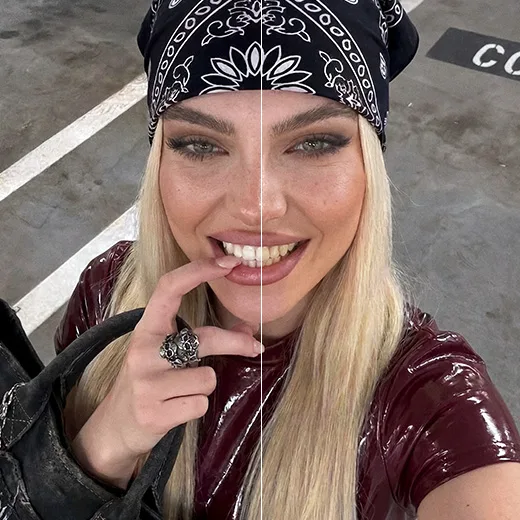
The trick is avoiding that fake, glowing look. When you whiten teeth in photo edits, the AI reads the lighting, brightens the enamel, and leaves gums and lips untouched, so your smile stands out without looking processed.
The Most Intuitive Whiten Teeth App
Editing should be quick. As an easy whiten teeth app, Facelab gets a perfect result in a single tap. Auto-detection finds your smile, so you never paint over teeth by hand. Slide the brightness to taste before you post.
Perfect Your Portraits with Precision
Our teeth whitening photo editor does more than brighten. It corrects uneven tones from shadows or an awkward angle, balancing exposure across your whole smile. Pair it with our lip and skin-smoothing tools for a complete beauty edit.
Stand out with Facelab.
Facelab is the quick and easy photo editing app to make impactful social posts, product images, and creative visuals. Create one-of-a-kind content fast — regardless of skill level — with powerful AI tools, an intuitive editor, and professional results ready to share in seconds.
What our users say
“I used to spend 20 minutes editing photos by hand. Now it takes 5 seconds. The results look more polished too.”
“Perfect for my e-commerce store. My listings look so much more professional now — and it's instant.”
“I tried every free tool out there. Facelab handles edge cases — hair, fine details — better than anything else.”
“I shoot products on my kitchen table. Facelab makes them look like a proper studio shot every time.”
“Used to outsource at $5 a photo. Now it's instant and free. The quality is identical — clients can't tell.”
“I edit photos for marketing assets in minutes. It completely changed how fast I can ship creative.”


Do more with the Facelab app
Get 25+ AI-powered editing tools, filters, and creative effects — free on iOS and Android.


Facelab AI Teeth Whitening App: Frequently Asked Questions
Get a perfect, bright smile and boost your confidence with Facelab. Read our FAQ to learn how our AI teeth whitening photo editor naturally enhances your portraits, corrects uneven shadows, and delivers a dazzling, authentic look with just one tap.
How does the Facelab teeth whitening app work?
The Facelab teeth whitening app works by using smart AI to instantly detect only your teeth and apply a precise brightening effect. Unlike harsh filters that bleach the entire mouth area, our tool restores the natural brilliance of your smile while keeping the results healthy and authentic.
Will the AI make my smile look fake or overly edited?
No, your smile will not look fake because our AI teeth whitening photo editor is specifically designed to preserve the natural texture and separation between your teeth. When you whiten teeth in photo edits, the AI analyzes the image's lighting to brighten the enamel while leaving your gums and lips completely untouched.
Can I control how much I whiten my teeth in a photo?
Yes, you retain full control over the intensity when you whiten teeth in a photo using Facelab. After the auto-detection feature identifies your smile, you can use a simple slider to adjust the brightness—from a subtle, conservative cleanup to a dazzling Hollywood smile that perfectly complements your skin tone.
Does Facelab's teeth whitening app fix shadows or uneven lighting on my smile?
Absolutely, Facelab's AI corrects uneven tones caused by bad shadows or tricky lighting angles. The AI automatically balances the exposure within your smile, ensuring consistent brightness across your entire dental arch so your teeth don't look artificially dark in low-light portraits.
Do I have to manually paint over my teeth to whiten them?
No manual painting is required because our user-friendly teeth whitening photo editor features automatic smile detection. With just a single tap, the AI perfectly maps your teeth, saving you the hassle of trying to accurately color over small details on your mobile screen before hitting the "post" button.
Try Facelab Now!
Virtual makeup, skin retouching, and AI enhancement — free to try right now.
Free to download · No commitment required