
Discover Your Look with Our AI Hairstyle Generator
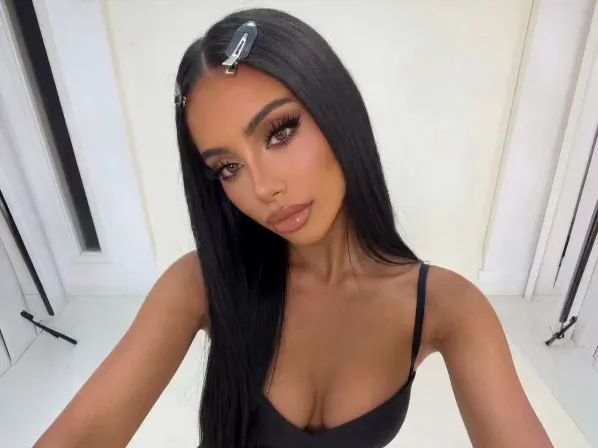
Try on a new AI hairstyle with a single tap and avoid salon regrets. Add volume, test trendy cuts, try bangs, and switch your color with no commitment. This hairstyle tool takes out the guesswork before scissors ever touch your hair.
Explore more Facelab tools
AI Make Up Editor
Apply virtual lipstick, eyeshadow, and blush instantly.
Open Tool →AI Hairstyle
Try any hairstyle and color — from subtle to bold.
Open Tool →Object Remover
Erase unwanted objects from photos with AI precision.
Open Tool →Photo Expander
Expand any photo with AI-generated edges in seconds.
Open Tool →Background Remover
Remove any background in seconds with AI precision.
Open Tool →Watermark Remover
Erase watermarks and logos from any image instantly.
Open Tool →AI LinkedIn Headshot
Generate professional headshots from any selfie.
Open Tool →Clothes AI Editor
Swap outfits and try new styles with AI.
Open Tool →AI Teeth Whitening
Brighten your smile with realistic whitening in one tap.
Open Tool →Eye Color AI Editor
Change eye color naturally — any shade, any photo.
Open Tool →AI Shadow Remover
Remove harsh shadows from photos automatically.
Open Tool →Image Upscaler
Enlarge photos up to 4× without losing quality.
Open Tool →Body Editor
Slim, reshape, or adjust body proportions with AI tools.
Open Tool →Skin Retouch
Smooth skin, reduce blemishes, perfect your complexion.
Open Tool →Face Shape Editor
Subtly reshape facial features with natural precision.
Open Tool →AI Profile Photo Editor
Turn any selfie into a stunning profile picture.
Open Tool →Resizing Image
Resize photos to any size without quality loss.
Open Tool →Instagram AI Photo Editor
Edit photos for Instagram with one tap AI presets.
Open Tool →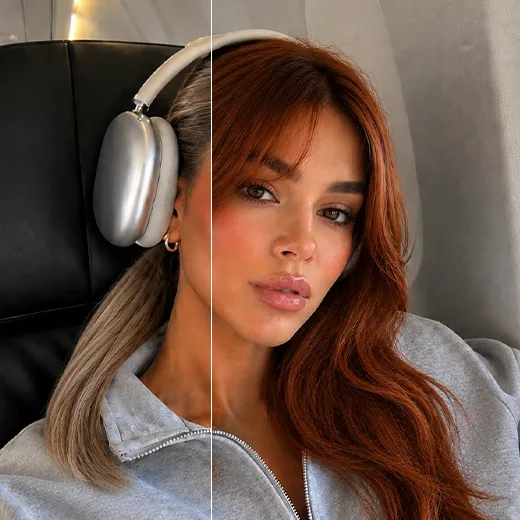
Transform Your Look with Hairstyle
Add volume, try sleek styles or soft curls, and test bangs with no commitment. Where many try on hairstyle apps look stiff and fake, our algorithm understands real hair, reading your face shape and lighting so each style looks natural, ideal for hairstyle and hair planning.
The Perfect Hairstyle
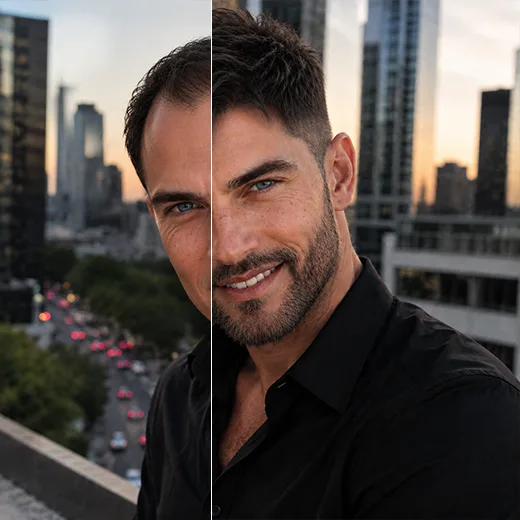
Whether you like classic cuts or viral looks, find what suits you. Facelab is your personal hairstyle helper, guiding you through decades of trends. For men, this app hair changer does more than the scalp: add or refine a beard and match it to a fresh haircut for a polished finish.
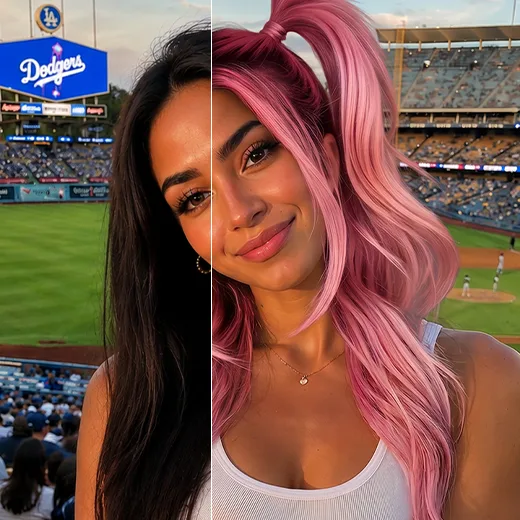
Switch Up Your Hair Color
Facelab is not only a hairstyle changer; experiment with new hair colors too. Our AI hair color changer covers the whole spectrum, platinum blonde, pastel, or fantasy neon, with zero damage. Go bold or natural, and test the shade with this color changer before you commit to real dye.
Stand out with Facelab.
Facelab is the quick and easy photo editing app to make impactful social posts, product images, and creative visuals. Create one-of-a-kind content fast — regardless of skill level — with powerful AI tools, an intuitive editor, and professional results ready to share in seconds.
What our users say
“I used to spend 20 minutes editing photos by hand. Now it takes 5 seconds. The results look more polished too.”
“Perfect for my e-commerce store. My listings look so much more professional now — and it's instant.”
“I tried every free tool out there. Facelab handles edge cases — hair, fine details — better than anything else.”
“I shoot products on my kitchen table. Facelab makes them look like a proper studio shot every time.”
“Used to outsource at $5 a photo. Now it's instant and free. The quality is identical — clients can't tell.”
“I edit photos for marketing assets in minutes. It completely changed how fast I can ship creative.”


Do more with the Facelab app
Get 25+ AI-powered editing tools, filters, and creative effects — free on iOS and Android.


Facelab AI Hairstyle Generator: Frequently Asked Questions
Explore how to find your perfect look with Facelab's free AI hairstyle generator. Read our FAQ to learn how our hair color changer app lets you try hairstyles online, experiment with hair color filters, and seamlessly edit your photos directly in your browser.
How does the AI hairstyle try-on work?
Facelab's AI hairstyle try-on allows you to instantly visualize different haircuts and styles on your own photos. Simply drag and drop a picture into the browser, and our free AI hairstyle generator seamlessly applies the new look, whether you want to test a trendy crop hairstyle or a long, flowing cut, delivering pro-quality results in one tap.
Can I test different hair colors before dyeing my hair?
Absolutely! Our hair color changer app features realistic hair color filters online. You can experiment with various shades—from natural tones to bold colors—for both men and women, helping you find your perfect hair color before making any real-life commitments.
Is the AI hairstyle generator free to use?
Yes, it is fast, simple, and free to try. You can experiment with our hair color changer app and try hairstyles online without any sign-up requirements. There is no watermark on the preview, and there is no limit on how many photos you can test before deciding on the right fit.
Do I need to download software to try hairstyles online?
No downloads or plugins are required. The Facelab AI hairstyle try-on works entirely in your web browser. You get studio-grade output and can easily apply hair color filters and new hairstyles without any steep learning curve.
Can I combine the hair color changer with other photo editing tools?
Yes! Once you find your perfect hairstyle, you can open your edit in the full Facelab app or web editor. This allows you to unlock the rest of your workflow to stack more effects, switch tools, fine-tune your portrait by hand, and get your image ready for publishing.
How does the AI Hairstyle Generator in Facelab work?
Facelab's AI Hairstyle Generator uses advanced hair segmentation technology to identify your current hair and replace or modify it seamlessly. The AI analyzes your head shape and facial features to map new hairstyles—such as voluminous curls, sleek straight cuts, or bangs—ensuring they align perfectly with your natural hairline for a realistic preview.
Can I see what I would look like with a different hair color?
Yes, the Facelab Hair Color tool allows for instant, non-destructive color experimentation. Unlike simple overlays, Facelab's AI adjusts the hue while preserving the natural shine and shadow of your hair strands. You can test everything from natural blondes and brunettes to vibrant, trendy dyes without the commitment of real chemical processing.
Does Facelab offer hairstyle and beard options for men?
Absolutely. Facelab features a specialized Men's Grooming Pack that includes modern hairstyles like fades and textured crops, as well as a Beard Tool. The AI intelligently integrates facial hair, allowing men to visualize different beard lengths and styles that complement their jawline and chosen haircut.
How do I know which hairstyle suits my face shape best?
The best way to find your perfect match is by using the Facelab AI Hairstyle simulator as a virtual mirror. By trying on various lengths and textures on your own photo, you can instantly see how different cuts interact with your specific face shape, helping you make a confident decision before visiting a barber or stylist.
Will the AI hairstyles look natural or like a sticker?
Facelab's AI technology is engineered to avoid the 'sticker effect' by prioritizing lighting adaptation and texture synthesis. The algorithms automatically adjust the lighting of the new hairstyle to match the environment of your original photo, ensuring the hair looks like it physically belongs in the scene.
Try Facelab Now!
Virtual makeup, skin retouching, and AI enhancement — free to try right now.
Free to download · No commitment required