

Erase Distractions with Facelab's AI Object Remover
Remove unwanted objects, clutter, and imperfections in one tap. Our AI Object Remover clears strangers, stray logos, blemishes, or creases in clothing cleanly and naturally. It is the cleanup tool that rescues photos a messy setting would otherwise ruin.

Explore more Facelab tools
AI Make Up Editor
Apply virtual lipstick, eyeshadow, and blush instantly.
Open Tool →AI Hairstyle
Try any hairstyle and color — from subtle to bold.
Open Tool →Object Remover
Erase unwanted objects from photos with AI precision.
Open Tool →Photo Expander
Expand any photo with AI-generated edges in seconds.
Open Tool →Background Remover
Remove any background in seconds with AI precision.
Open Tool →Watermark Remover
Erase watermarks and logos from any image instantly.
Open Tool →AI LinkedIn Headshot
Generate professional headshots from any selfie.
Open Tool →Clothes AI Editor
Swap outfits and try new styles with AI.
Open Tool →AI Teeth Whitening
Brighten your smile with realistic whitening in one tap.
Open Tool →Eye Color AI Editor
Change eye color naturally — any shade, any photo.
Open Tool →AI Shadow Remover
Remove harsh shadows from photos automatically.
Open Tool →Image Upscaler
Enlarge photos up to 4× without losing quality.
Open Tool →Body Editor
Slim, reshape, or adjust body proportions with AI tools.
Open Tool →Skin Retouch
Smooth skin, reduce blemishes, perfect your complexion.
Open Tool →Face Shape Editor
Subtly reshape facial features with natural precision.
Open Tool →AI Profile Photo Editor
Turn any selfie into a stunning profile picture.
Open Tool →Resizing Image
Resize photos to any size without quality loss.
Open Tool →Instagram AI Photo Editor
Edit photos for Instagram with one tap AI presets.
Open Tool →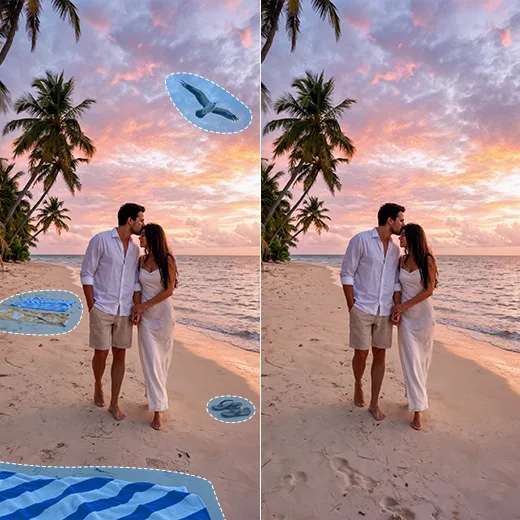
Remove Objects from Photo Backgrounds Instantly
Say goodbye to photobombers, busy backgrounds, and stray logos. Our tool erases anything that pulls focus, with the speed and accuracy to remove objects from photo backgrounds instantly. Swipe over what you want gone, it has never been easier to remove objects from image files without desktop software.
Refine Details with a Precision Objects Remover
Remover is not only for backgrounds; it is great for retouching too. Sometimes the distraction is a stain or a stray hair across your face. As a precise objects remover, Facelab erases blemishes, stray hairs, creases, or shadows while your photo stays natural, texture intact.
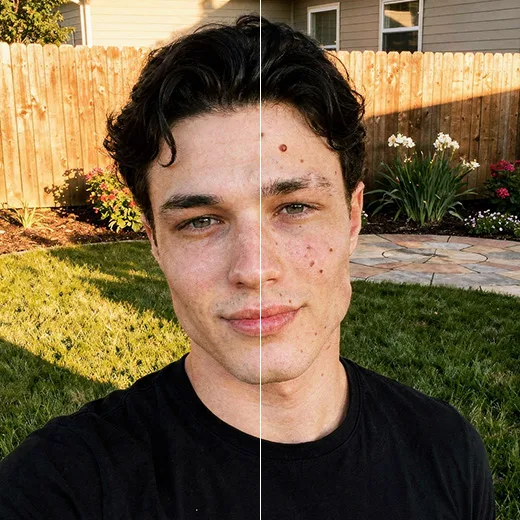

Remove Objects from Image Files with Prescision & Perfection
Our AI studies the area around whatever you delete and fills it naturally. Where basic tools leave smudges, our AI objects remover reconstructs the background with context-aware processing. It predicts what belongs behind the object, a wall, sky, or foliage, for an invisible edit.
Stand out with Facelab.
Facelab is the quick and easy photo editing app to make impactful social posts, product images, and creative visuals. Create one-of-a-kind content fast — regardless of skill level — with powerful AI tools, an intuitive editor, and professional results ready to share in seconds.
What our users say
“I used to spend 20 minutes editing photos by hand. Now it takes 5 seconds. The results look more polished too.”
“Perfect for my e-commerce store. My listings look so much more professional now — and it's instant.”
“I tried every free tool out there. Facelab handles edge cases — hair, fine details — better than anything else.”
“I shoot products on my kitchen table. Facelab makes them look like a proper studio shot every time.”
“Used to outsource at $5 a photo. Now it's instant and free. The quality is identical — clients can't tell.”
“I edit photos for marketing assets in minutes. It completely changed how fast I can ship creative.”


Do more with the Facelab app
Get 25+ AI-powered editing tools, filters, and creative effects — free on iOS and Android.


Facelab AI Object Remover: Frequently Asked Questions
Discover how to perfectly clean up your shots with Facelab. Read our FAQ to learn how our intuitive app helps you remove unwanted objects from photos, erase photobombers, and flawlessly reconstruct backgrounds with just one tap.
How can I remove unwanted objects from photos using Facelab?
You can easily remove objects from photos simply by swiping over them. Our AI Object Remover is designed for speed and accuracy, allowing you to instantly erase photobombers, trash cans, or clutter without needing any complex desktop software.
Can this app remove people in the background from my images?
Yes, Facelab is the perfect app to remove objects and people from your backgrounds. Whether a stranger walks by or someone photobombs your perfect selfie, you can seamlessly erase them. The AI intelligently reconstructs the scenery behind them to ensure an invisible edit.
Does the AI object remover work on small details like blemishes and wrinkles?
Absolutely. Our precision objects remover isn't just for backgrounds—it is perfect for delicate retouching. You can effortlessly erase skin imperfections, stray hairs, stains, and wrinkles on clothing with surgical precision, all while prioritizing texture retention so the edit looks natural.
How does the app reconstruct the background when I remove an unwanted object?
Facelab uses advanced context-aware AI algorithms that analyze the surrounding details to naturally fill in the removed areas. Whether the background is a brick wall, sky, or foliage, the AI predicts what should be there and generates a flawless, consistent replacement without blurry smudges.
Do I need any special skills to remove objects from image files with this tool?
No special skills are required. Facelab serves as the ultimate cleanup tool with an intuitive interface. You can achieve professional results and remove objects from image files with just a swipe, allowing you to salvage photos and create impactful visuals fast, regardless of your editing experience.
How does the Facelab Object Remover erase items without leaving a blur?
The Facelab Object Remover utilizes advanced generative inpainting technology. Instead of just blurring the area, the AI analyzes the surrounding pixels—texture, lighting, and patterns—to intelligently reconstruct the background where the object used to be. This ensures that the edited area blends perfectly with the rest of the photo.
Can Facelab remove people or photobombers from the background?
Yes, removing unwanted people is a primary feature of Facelab's AI. You can highlight a photobomber or a crowd in the background, and the Facelab AI engine will erase them while regenerating the scenery behind them, making it look as if they were never there.
Does this tool work for removing text, dates, or watermarks?
Absolutely. The Facelab Remove Object tool is highly effective at detecting and erasing high-contrast elements like text overlays, date stamps, and logos. The AI creates a clean surface underneath, which is ideal for restoring images or cleaning up social media posts.
Is the tool precise enough to fix wrinkles on clothes or skin blemishes?
Yes, Facelab offers high-precision removal for detailed retouching. Beyond large objects, the AI can target small imperfections like creases in fabric, acne, or stray hairs. The Facelab algorithm smooths these specific areas while keeping the surrounding fabric or skin texture intact for a realistic look.
Is the Object Remover free to use in Facelab?
Facelab provides free access to basic object removal tools for quick edits. However, for complex removals, unlimited edits, and high-resolution exports without quality loss, users can upgrade to Facelab Pro. This ensures access to the most powerful version of our generative AI models.
Try Facelab Now!
Virtual makeup, skin retouching, and AI enhancement — free to try right now.
Free to download · No commitment required