
AI Face Shape Editor – Reshape Your Face Instantly
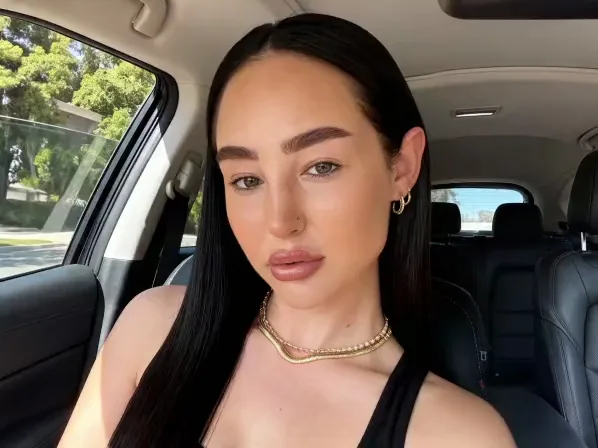
The AI Face Shape Editor adjusts your nose, eye size, jawline, and cheeks with no Photoshop skills. As a leading face shape editor, it gives you full control over face slimming, jaw sharpening, and eye lifting. Use it as a subtle AI face reshaper to fix camera distortion, or edit face shape contours for a creative project, free on your phone.
Explore more Facelab tools
AI Make Up Editor
Apply virtual lipstick, eyeshadow, and blush instantly.
Open Tool →AI Hairstyle
Try any hairstyle and color — from subtle to bold.
Open Tool →Object Remover
Erase unwanted objects from photos with AI precision.
Open Tool →Photo Expander
Expand any photo with AI-generated edges in seconds.
Open Tool →Background Remover
Remove any background in seconds with AI precision.
Open Tool →Watermark Remover
Erase watermarks and logos from any image instantly.
Open Tool →AI LinkedIn Headshot
Generate professional headshots from any selfie.
Open Tool →Clothes AI Editor
Swap outfits and try new styles with AI.
Open Tool →AI Teeth Whitening
Brighten your smile with realistic whitening in one tap.
Open Tool →Eye Color AI Editor
Change eye color naturally — any shade, any photo.
Open Tool →AI Shadow Remover
Remove harsh shadows from photos automatically.
Open Tool →Image Upscaler
Enlarge photos up to 4× without losing quality.
Open Tool →Body Editor
Slim, reshape, or adjust body proportions with AI tools.
Open Tool →Skin Retouch
Smooth skin, reduce blemishes, perfect your complexion.
Open Tool →Face Shape Editor
Subtly reshape facial features with natural precision.
Open Tool →AI Profile Photo Editor
Turn any selfie into a stunning profile picture.
Open Tool →Resizing Image
Resize photos to any size without quality loss.
Open Tool →Instagram AI Photo Editor
Edit photos for Instagram with one tap AI presets.
Open Tool →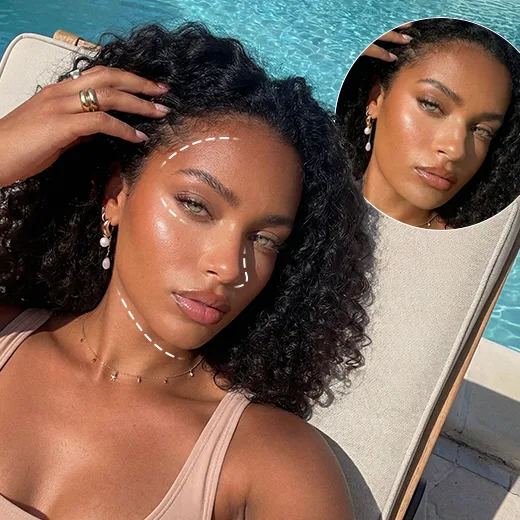
Fix and Retouch with Max Precision Face Shape Correction
Facelab detects your facial structure so you can make small or major changes in real time. Precision matters in face shape correction, so the algorithms map your landmarks instantly. Adjust your smile, reshape your eyes, and improve symmetry, with face reshaping AI that delivers clean, realistic results and no filters.
Discover Your Look with an One-Click Face Shape Changer
Not sure what face shape you have? Facelab identifies it, diamond, round, oval, or heart, and works as a smart face shape changer to help you picture ideal proportions. Try new looks or slim your cheeks and chin in one click with face shape change AI, free and easy.
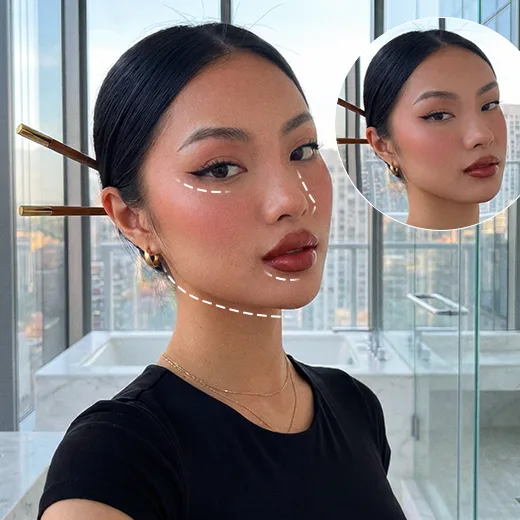
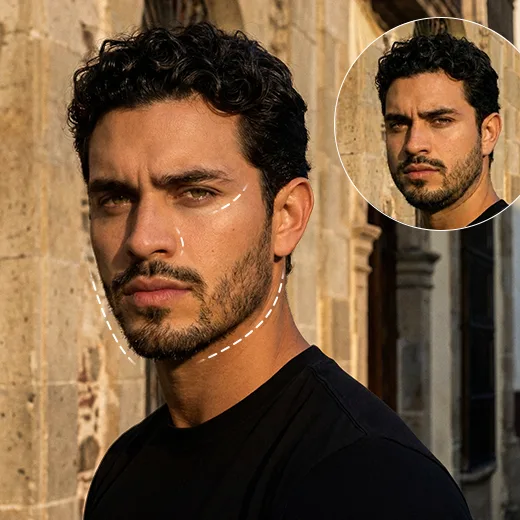
All-in-One AI Face Reshaper & Retouch Tool
Facelab is more than a face shape tool; it is a complete face correction suite. Beyond reshaping, smooth skin, enhance eyes, lift eyebrows, correct a smile, and remove blemishes. As a capable AI face reshaper, it runs on both Android and iOS with natural results.
Stand out with Facelab.
Facelab is the quick and easy photo editing app to make impactful social posts, product images, and creative visuals. Create one-of-a-kind content fast — regardless of skill level — with powerful AI tools, an intuitive editor, and professional results ready to share in seconds.
What our users say
“I used to spend 20 minutes editing photos by hand. Now it takes 5 seconds. The results look more polished too.”
“Perfect for my e-commerce store. My listings look so much more professional now — and it's instant.”
“I tried every free tool out there. Facelab handles edge cases — hair, fine details — better than anything else.”
“I shoot products on my kitchen table. Facelab makes them look like a proper studio shot every time.”
“Used to outsource at $5 a photo. Now it's instant and free. The quality is identical — clients can't tell.”
“I edit photos for marketing assets in minutes. It completely changed how fast I can ship creative.”


Do more with the Facelab app
Get 25+ AI-powered editing tools, filters, and creative effects — free on iOS and Android.


Facelab AI Face Shape Editor: Frequently Asked Questions
Discover how to effortlessly modify your facial features with Facelab. Read our FAQ to learn how our advanced AI face shape editor allows you to correct symmetry, slim your jawline, and achieve your ideal look using powerful, free mobile tools without any Photoshop experience.
How does the AI face shape editor work to adjust my features?
Our AI face shape editor uses advanced algorithms to instantly map your facial landmarks. This allows the AI face reshaper to provide complete control over adjusting your nose shape, jawline, and cheek dimensions in real time, ensuring seamless and natural-looking results without needing Photoshop.
Can I use this tool for precise face shape correction and symmetry?
Yes, precision is critical in face shape correction. The editor detects your unique facial structure, enabling you to make real-time modifications to correct your smile, change your eye shape, and achieve perfect facial symmetry. It provides clean, realistic enhancements to your natural features without relying on filters.
How does the face shape changer help me discover my ideal look?
Facelab acts as an intelligent face shape changer by analyzing your photo to determine your specific face shape—whether it is diamond, round, oval, or heart. Using face-shape-changing AI technology, you can visualize ideal proportions, slim down features like your cheeks or chin, and try new looks with just one click.
Can I use the app to edit my face shape and smooth my skin at the same time?
Absolutely! Facelab is a comprehensive, all-in-one AI face correction tool. Not only can you fully edit the contours of your face shape, but the application also provides a single interface to smooth skin, lift eyebrows, enhance eyes, correct your smile, and remove blemishes for a holistic beauty edit.
Is the face-reshaping AI tool free to use on mobile devices?
Yes! The face-reshaping AI tool operates at no cost and functions directly on your mobile device. Powered by state-of-the-art AI, the Facelab mobile application is available for both Android and iOS, delivering professional-grade photo editing and casual retouching straight from your phone.
How does the Facelab AI Face Shape Editor slim the face naturally?
The Facelab AI Face Shape Editor uses a sophisticated mesh distortion algorithm. Instead of simply squeezing the image, the Facelab AI identifies the outer contours of the cheeks and jaw to subtly reduce width. This mimics the effect of weight loss or contouring makeup, ensuring the face looks naturally slimmer without warping the background.
Can Facelab identify my face shape automatically?
Yes, Facelab's Face Shape Analyzer takes the guesswork out of styling. By mapping key points on your forehead, cheekbones, and chin, the AI determines if your face is Oval, Round, Square, Heart, or Diamond. Based on this analysis, Facelab suggests specific edits to harmonize your features.
Is it possible to sharpen the jawline or reduce the chin with Facelab?
Absolutely. Facelab includes dedicated tools for Jawline Sculpting and Chin Reduction. You can adjust the 'V-line' of your face by refining the chin's width and sharpening the mandibular angle. The Facelab AI respects the natural shadow fall under the jaw, making the sharpened result look realistic.
Can the Face Shape Editor correct facial asymmetry?
Yes, fixing asymmetry is a core feature of Facelab. If one eye is slightly lower or the smile is uneven, the Facelab Symmetry Correction tool allows you to nudge individual features into alignment. The AI separates facial elements so you can balance them independently without affecting the rest of the face.
Is the Facelab Face Shape Editor free to use?
Facelab offers many essential face reshaping tools for free, allowing users to try slimming and basic contouring immediately. However, for advanced structural changes, unlimited asymmetry correction, and high-resolution saving, a Facelab Premium subscription provides full access to the most powerful AI sculpting algorithms.
Try Facelab Now!
Virtual makeup, skin retouching, and AI enhancement — free to try right now.
Free to download · No commitment required