

Body Editor: Sculpt Your Ideal Silhouette
Refine your waist, lengthen your legs, or sculpt muscle. As an app that edits body features with professional accuracy, this edit your body app gives anyone a balanced, natural look, no desktop software needed.

Explore more Facelab tools
AI Make Up Editor
Apply virtual lipstick, eyeshadow, and blush instantly.
Open Tool →AI Hairstyle
Try any hairstyle and color — from subtle to bold.
Open Tool →Object Remover
Erase unwanted objects from photos with AI precision.
Open Tool →Photo Expander
Expand any photo with AI-generated edges in seconds.
Open Tool →Background Remover
Remove any background in seconds with AI precision.
Open Tool →Watermark Remover
Erase watermarks and logos from any image instantly.
Open Tool →AI LinkedIn Headshot
Generate professional headshots from any selfie.
Open Tool →Clothes AI Editor
Swap outfits and try new styles with AI.
Open Tool →AI Teeth Whitening
Brighten your smile with realistic whitening in one tap.
Open Tool →Eye Color AI Editor
Change eye color naturally — any shade, any photo.
Open Tool →AI Shadow Remover
Remove harsh shadows from photos automatically.
Open Tool →Image Upscaler
Enlarge photos up to 4× without losing quality.
Open Tool →Body Editor
Slim, reshape, or adjust body proportions with AI tools.
Open Tool →Skin Retouch
Smooth skin, reduce blemishes, perfect your complexion.
Open Tool →Face Shape Editor
Subtly reshape facial features with natural precision.
Open Tool →AI Profile Photo Editor
Turn any selfie into a stunning profile picture.
Open Tool →Resizing Image
Resize photos to any size without quality loss.
Open Tool →Instagram AI Photo Editor
Edit photos for Instagram with one tap AI presets.
Open Tool →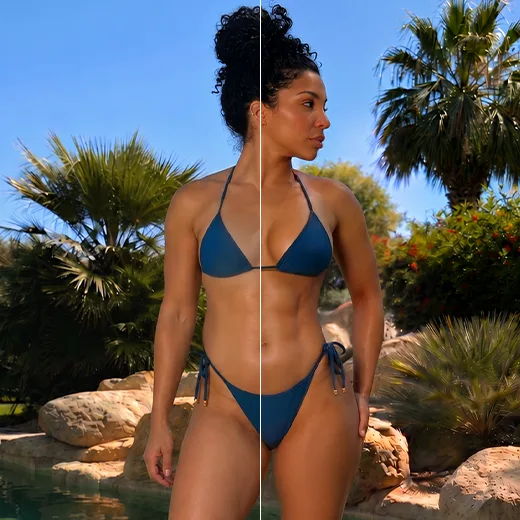
Body Shaping & Skin Enhancements
Want an app to reshape body contours while keeping the background straight? Adjust your waistline, smooth your stomach, enhance curves, or lengthen legs, all with natural results. Unlike a basic body changer photo editor that warps the image, Facelab respects the photo's physics.
Smooth, Even, and Radiant Skin
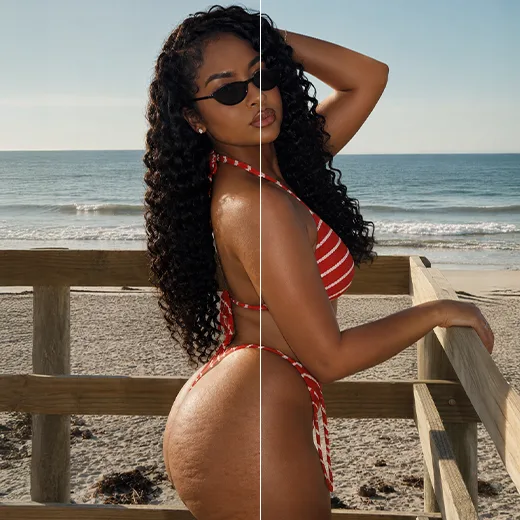
These tools are built for the body, not the face. As a body enhancing app, Facelab treats every inch of skin. The Tan tool adds a sun-kissed glow, while Even Skin works as an app to enhance body parts, softening cellulite and uneven texture for a polished, authentic finish.
Enhance Muscle Definition
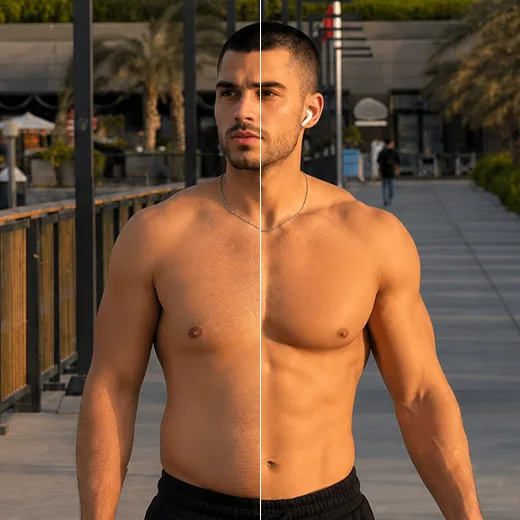
The AI Muscles tool sculpts your abs, arms, back, and legs for a toned look. This is a real AI body enhancer that understands anatomy, not fake overlays. Choose subtle or bold, and as a leading body editing AI app, Facelab places definition where it belongs, so your progress looks real.
Stand out with Facelab.
Facelab is the quick and easy photo editing app to make impactful social posts, product images, and creative visuals. Create one-of-a-kind content fast — regardless of skill level — with powerful AI tools, an intuitive editor, and professional results ready to share in seconds.
What our users say
“I used to spend 20 minutes editing photos by hand. Now it takes 5 seconds. The results look more polished too.”
“Perfect for my e-commerce store. My listings look so much more professional now — and it's instant.”
“I tried every free tool out there. Facelab handles edge cases — hair, fine details — better than anything else.”
“I shoot products on my kitchen table. Facelab makes them look like a proper studio shot every time.”
“Used to outsource at $5 a photo. Now it's instant and free. The quality is identical — clients can't tell.”
“I edit photos for marketing assets in minutes. It completely changed how fast I can ship creative.”


Do more with the Facelab app
Get 25+ AI-powered editing tools, filters, and creative effects — free on iOS and Android.


Facelab AI Body Editor: Frequently Asked Questions
Discover how to sculpt your ideal silhouette effortlessly with Facelab. Read our FAQ to learn how our advanced body editing AI app helps you adjust proportions, smooth skin, and enhance muscle definition with natural, undetectable results without warping your photos.
How does this app that edits body features prevent the background from warping?
Unlike a basic body changer photo editor that distorts the surrounding image, our app uses advanced AI to ensure every adjustment respects the photo's physics. When you use the app to reshape body contours, it naturally keeps the background straight and makes your edits completely undetectable.
Can I use the edit-your-body app to change my height or proportions?
Yes! Facelab gives you complete control over your proportions. You can seamlessly lengthen your legs, redefine your shoulders, head, and neck, adjust your waistline, and enhance your curves for a perfectly balanced aesthetic.
Does the AI body enhancer use fake overlays for muscle definition?
No, our AI Muscles tool does not just paste fake overlays. As a true AI body enhancer, it understands human anatomy and analyzes light and shadow to place realistic muscle definition exactly where it belongs on your abs, arms, back, and legs.
Can I use this as an app to enhance body parts by smoothing my skin?
Absolutely. Facelab is a comprehensive body-enhancing app equipped with an Even Skin tool. It helps you refine texture by smoothing out imperfections like cellulite, minor blemishes, and uneven textures, creating a polished and authentic look.
Is there a way to add a tan using the body editing AI app?
Yes! Our app features a dedicated Tan tool that allows you to instantly adjust your skin tone. You can easily add a natural-looking, sun-kissed glow to your body regardless of the season, enhancing your overall radiance with just one tap.
How does the Facelab Body Editor reshape the body without warping the background?
Facelab's AI Body Editor utilizes advanced subject segmentation technology. Before any reshaping occurs, the AI separates the person from the background layer. This ensures that when you slim your waist or enhance curves, the walls, doorframes, and horizon lines behind you remain perfectly straight, avoiding the tell-tale signs of photo editing.
Can I add realistic muscle definition or abs using Facelab?
Yes, the Facelab AI Muscle Enhancer is designed to add realistic definition. Instead of pasting fake stickers, Facelab's generative AI analyzes the lighting and shadows of your original photo to contour your existing skin. You can subtly define abs, chest, or arm muscles that match your body type and skin tone naturally.
How does the Leg Lengthening tool keep body proportions looking natural?
The Facelab Height Correction tool uses a 'smart stretch' algorithm. It identifies the waist, knees, and ankles to elongate the legs specifically in the thigh and shin areas, rather than stretching the whole image. This maintains the structural integrity of the torso and head size, making you look naturally taller rather than 'stretched'.
Can Facelab give me a tan without changing the color of my clothes?
Absolutely. Facelab's Skin Tone mapping technology isolates skin pixels from clothing, hair, and backgrounds. You can use the Tan tool to adjust the melanin levels—from a subtle glow to a deep bronze—applying the color grade only to your skin while keeping your white shirt or colorful dress perfectly untouched.
Is the Body Editor capable of removing cellulite or stretch marks?
Yes, Facelab includes a specialized Even Skin tool for the body. Unlike simple blurring, which looks fake, our AI detects textural irregularities like cellulite or stretch marks and replaces them with smooth skin texture taken from surrounding areas. This retains the natural look of skin (pores and lighting) while removing the unwanted texture.
Try Facelab Now!
Virtual makeup, skin retouching, and AI enhancement — free to try right now.
Free to download · No commitment required