
Fix Lighting Instantly with the AI Shadow Remover
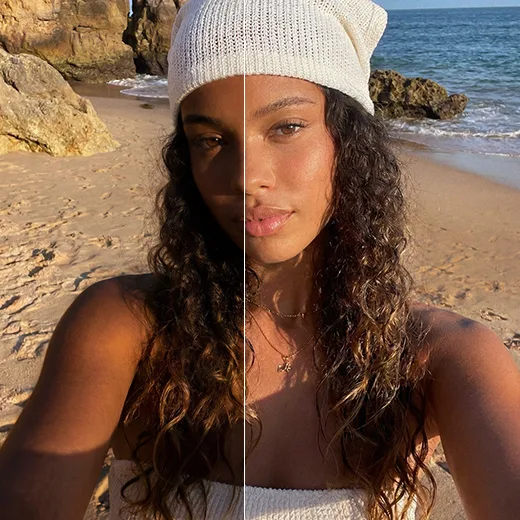
Harsh sun, hat brims, or uneven indoor light can throw unflattering shadows across a face. Facelab's AI shadow remover rescues those shots. It reads the 3D structure of your face, so it lifts shadows without washing out the image. Instead of raising overall brightness, the tool targets only the dark areas and rebuilds the skin tone hidden underneath. Upload your photo for a balanced, evenly lit result in seconds.

Explore more Facelab tools
AI Make Up Editor
Apply virtual lipstick, eyeshadow, and blush instantly.
Open Tool →AI Hairstyle
Try any hairstyle and color — from subtle to bold.
Open Tool →Object Remover
Erase unwanted objects from photos with AI precision.
Open Tool →Photo Expander
Expand any photo with AI-generated edges in seconds.
Open Tool →Background Remover
Remove any background in seconds with AI precision.
Open Tool →Watermark Remover
Erase watermarks and logos from any image instantly.
Open Tool →AI LinkedIn Headshot
Generate professional headshots from any selfie.
Open Tool →Clothes AI Editor
Swap outfits and try new styles with AI.
Open Tool →AI Teeth Whitening
Brighten your smile with realistic whitening in one tap.
Open Tool →Eye Color AI Editor
Change eye color naturally — any shade, any photo.
Open Tool →AI Shadow Remover
Remove harsh shadows from photos automatically.
Open Tool →Image Upscaler
Enlarge photos up to 4× without losing quality.
Open Tool →Body Editor
Slim, reshape, or adjust body proportions with AI tools.
Open Tool →Skin Retouch
Smooth skin, reduce blemishes, perfect your complexion.
Open Tool →Face Shape Editor
Subtly reshape facial features with natural precision.
Open Tool →AI Profile Photo Editor
Turn any selfie into a stunning profile picture.
Open Tool →Resizing Image
Resize photos to any size without quality loss.
Open Tool →Instagram AI Photo Editor
Edit photos for Instagram with one tap AI presets.
Open Tool →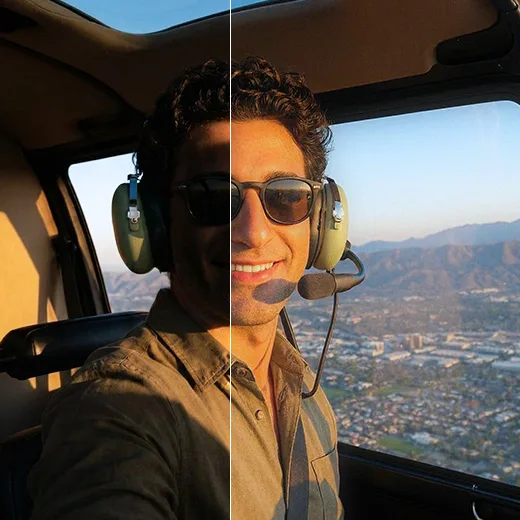
The Ultimate Photo Shadow Remover for Portraits
Shadows deepen wrinkles, hide the eyes, and distort your features. Our photo shadow remover softens those harsh contrasts, ideal for selfies shot in midday sun, keeping your natural contours for a soft, studio-quality result.
Restore Details with AI Precision
Our AI shadow remover tells good shadows, the ones that define your jawline and nose, from the bad ones that hide your features. You keep a sculpted, three-dimensional look, with the depth and realism of your original shot intact.
Clean Up Backgrounds and Objects
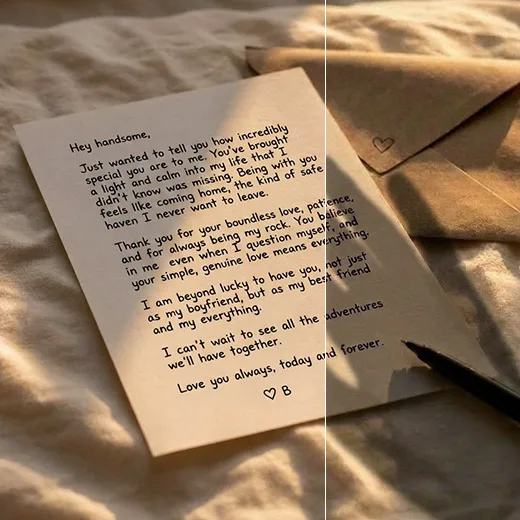
The shadow remover app is not only for faces. Use it on product shots, flat lays, and travel photos. If your hand casts a shadow over a document, Facelab erases it in one tap, for a cleaner, more professional look.
Stand out with Facelab.
Facelab is the quick and easy photo editing app to make impactful social posts, product images, and creative visuals. Create one-of-a-kind content fast — regardless of skill level — with powerful AI tools, an intuitive editor, and professional results ready to share in seconds.

What our users say
“I finally got rid of the hard shadow my hat cast over my eyes. The photo looks like it was taken in perfect light now!”
“Midday selfies were always a nightmare with those harsh shadows. This app fixes them in one tap. Incredible.”
“It removes the bad shadows but keeps my face looking natural and three-dimensional. It doesn't flatten my features at all.”
“I use it for my product photos. No more annoying shadows from my hand or the lamp. Clean, professional shots every time.”
“Backlit photos used to turn me into a dark silhouette. Now I can recover all the detail in my face. A total game changer.”
“Fast, easy, and the results look real. Worth every penny — I'd happily pay way more than $5 for this.”


Do more with the Facelab app
Get 25+ AI-powered editing tools, filters, and creative effects — free on iOS and Android.


Facelab AI Shadow Remover: Frequently Asked Questions
Remove unwanted dark spots and achieve professional lighting with Facelab. Read our FAQ to learn how our AI shadow remover intelligently lifts harsh contrasts, preserves natural facial contours, and cleans up both portraits and product photography instantly.
How does the AI shadow remover work on harsh lighting?
The Facelab AI shadow remover uses deep learning algorithms to understand the 3D structure of your face and environment. It selectively lifts dark, obscured areas caused by harsh sunlight or hat brims without washing out the rest of the image, intelligently reconstructing the hidden skin tone and texture.
Is the photo shadow remover better than just increasing image brightness?
Yes, using a dedicated photo shadow remover is much better than simply increasing overall brightness. While turning up brightness can overexpose your background and wash out details, our AI targets only the unwanted shadows, ensuring a perfectly balanced and evenly lit exposure.
Will the shadow remover app make my face look flat?
No, the shadow remover app will not make your face look flat. Our advanced AI differentiates between "bad" shadows that obscure your features and "good" shadows that define your jawline and nose. This precision ensures you retain natural depth, dimensionality, and a sculpted look.
Can I use the AI shadow remover for outdoor midday selfies?
Absolutely! The AI shadow remover is highly effective for outdoor selfies taken during the midday sun, where high-contrast shadows are inevitable. It smoothly transitions between light and dark areas, softening harsh contrasts while preserving your face's natural contours.
Does the shadow remover app work on objects and backgrounds?
Yes, the shadow remover app is not limited to portraits. You can use it to instantly erase distracting shadows cast by your hand over documents, clean up product photography, or enhance flat lays and food shots, ensuring the focus remains entirely on your subject.
Try Facelab Now!
Join millions of creators using Facelab to edit photos like a pro. Download the app and start creating stunning visuals in seconds.
Free to download · No commitment required