

AI Photo Expander: Uncrop & Expand Your Photos
Need more room in your shot? Our AI photo expander fixes tight framing without cropping details. It extends borders, adjusts the aspect ratio, and improves composition, the easiest way to uncrop image edges that feel too tight.

Explore more Facelab tools
AI Make Up Editor
Apply virtual lipstick, eyeshadow, and blush instantly.
Open Tool →AI Hairstyle
Try any hairstyle and color — from subtle to bold.
Open Tool →Object Remover
Erase unwanted objects from photos with AI precision.
Open Tool →Photo Expander
Expand any photo with AI-generated edges in seconds.
Open Tool →Background Remover
Remove any background in seconds with AI precision.
Open Tool →Watermark Remover
Erase watermarks and logos from any image instantly.
Open Tool →AI LinkedIn Headshot
Generate professional headshots from any selfie.
Open Tool →Clothes AI Editor
Swap outfits and try new styles with AI.
Open Tool →AI Teeth Whitening
Brighten your smile with realistic whitening in one tap.
Open Tool →Eye Color AI Editor
Change eye color naturally — any shade, any photo.
Open Tool →AI Shadow Remover
Remove harsh shadows from photos automatically.
Open Tool →Image Upscaler
Enlarge photos up to 4× without losing quality.
Open Tool →Body Editor
Slim, reshape, or adjust body proportions with AI tools.
Open Tool →Skin Retouch
Smooth skin, reduce blemishes, perfect your complexion.
Open Tool →Face Shape Editor
Subtly reshape facial features with natural precision.
Open Tool →AI Profile Photo Editor
Turn any selfie into a stunning profile picture.
Open Tool →Resizing Image
Resize photos to any size without quality loss.
Open Tool →Instagram AI Photo Editor
Edit photos for Instagram with one tap AI presets.
Open Tool →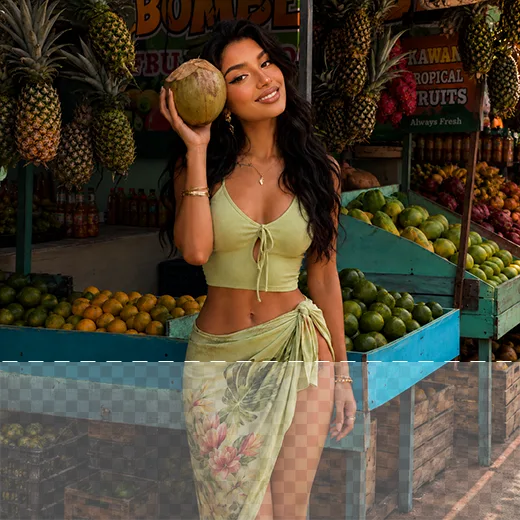
Extend, Resize & Transform Photos with Our AI Uncrop Image Tool
Uncrop uses AI outpainting to extend borders while keeping details natural. When you need to expand photo background to fit a layout, our AI uncrop image engine generates fresh content that matches the original lighting and texture.
Expand Your Photo Background for Seamless Results
No complex editing required. Uncrop works in seconds, and where basic tools stretch and distort the edges, our photo expander rebuilds believable detail to fill the gap, keeping your composition intact and saving you hours.
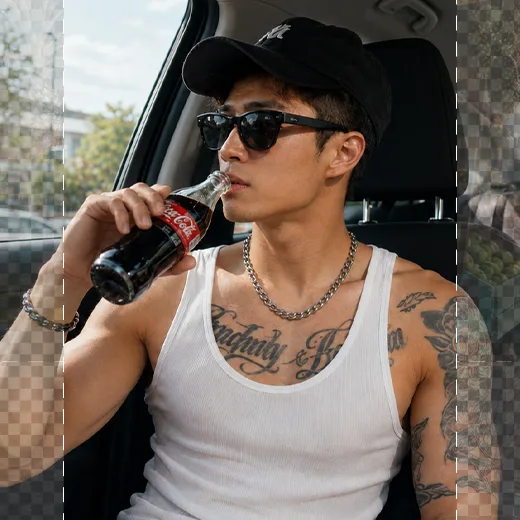
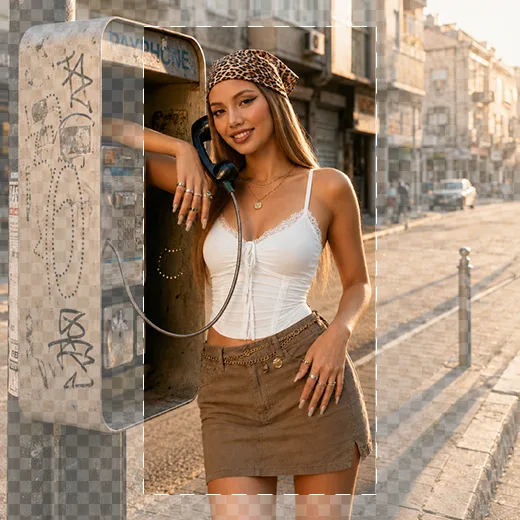
Uncrop Image Layouts for Any Format
Uncrop supports a full range of ratios, 16:9, 4:3, 9:16, 4:5, and 1:1, so you can adapt any image for Instagram, YouTube, or a presentation. Take a horizontal photo and reframe it vertically for a Reel without losing the subject.
Stand out with Facelab.
Facelab is the quick and easy photo editing app to make impactful social posts, product images, and creative visuals. Create one-of-a-kind content fast — regardless of skill level — with powerful AI tools, an intuitive editor, and professional results ready to share in seconds.
What our users say
“I used to spend 20 minutes editing photos by hand. Now it takes 5 seconds. The results look more polished too.”
“Perfect for my e-commerce store. My listings look so much more professional now — and it's instant.”
“I tried every free tool out there. Facelab handles edge cases — hair, fine details — better than anything else.”
“I shoot products on my kitchen table. Facelab makes them look like a proper studio shot every time.”
“Used to outsource at $5 a photo. Now it's instant and free. The quality is identical — clients can't tell.”
“I edit photos for marketing assets in minutes. It completely changed how fast I can ship creative.”


Do more with the Facelab app
Get 25+ AI-powered editing tools, filters, and creative effects — free on iOS and Android.


Facelab AI Photo Expander: Frequently Asked Questions
Discover how to resize and extend your images effortlessly with Facelab. Read our FAQ to learn how our advanced AI photo expander uses smart outpainting to uncrop images, adjust aspect ratios, and seamlessly expand photo backgrounds for any project or social media platform.
How does the AI photo expander work to uncrop my images?
Facelab's AI photo expander uses advanced outpainting technology to extend image borders and adjust aspect ratios. Instead of just stretching the edges, the AI intelligently generates new realistic content that perfectly matches your original shot's lighting, texture, and composition.
Can I expand a photo background to fit different social media formats?
Yes! Our AI uncrop image tool supports a full range of aspect ratios, including 16:9, 1:1, 9:16, 4:5, and more. This makes it incredibly easy to expand your photo background, like turning a horizontal photo into a vertical format perfectly sized for Instagram Reels, TikTok, or YouTube.
Will the extended borders look natural, or will the picture be stretched?
The extended areas will look completely natural. Unlike traditional tools that simply stretch edges and cause distortion, our smart photo expander reconstructs realistic details to fill the missing areas. It blends perfectly with your original image for seamless, professional results.
How long does it take to uncrop an image with Facelab?
It takes just a few seconds! Our AI uncrop image engine generates realistic extensions instantly, saving you hours of complex manual retouching work while delivering stunning accuracy.
Do I lose any essential details of my original subject when expanding?
Not at all. The tool solves the problem of tight, claustrophobic framing without cropping out any essential details. By resizing the world around your subject, the AI photo expander gives your subject room to breathe while preserving all original elements.
How does the AI Uncrop tool in Facelab actually extend images?
Facelab's AI Uncrop tool uses a technology called generative outpainting. Instead of stretching the image, the AI analyzes the existing pixels—patterns, lighting, and textures—and 'hallucinates' or generates new content to fill the empty space. Whether it's extending a beach horizon or a studio background, Facelab creates new pixels that seamlessly match the original scene.
Can I convert a horizontal photo into a vertical one for Instagram Stories?
Yes, this is the most popular use case for Facelab's Photo Expander. You can take a horizontal (landscape) photo and change the aspect ratio to 9:16 (vertical). Facelab's AI will generate the missing top and bottom sections of the image, allowing you to post a full-screen Story or Reel without zooming in or cropping out important details.
Will the expanded background look blurry or fake?
Facelab's generative engine is designed to maintain high fidelity. It replicates the 'film grain' and noise level of the original photo so the new sections don't look like smooth, plastic patches. The AI creates context-aware extensions, meaning if your background is a complex forest, Facelab generates more trees and leaves, not just green blur.
What aspect ratios does the Facelab Expander support?
Facelab supports all industry-standard formats for social media and print. You can expand images to 16:9 (YouTube), 9:16 (TikTok/Reels), 1:1 (Square Posts), 4:5 (Portrait), and more. The Facelab Uncrop interface allows you to toggle between these ratios instantly to see which composition works best for your needs.
Is the Uncrop feature free for all users?
Facelab allows users to try the Uncrop tool with basic functionality. However, generating high-definition extensions and accessing the fastest processing speeds requires a Facelab Premium subscription. The Premium tier ensures the AI has the computational power to render complex backgrounds with the highest possible realism.
Try Facelab Now!
Virtual makeup, skin retouching, and AI enhancement — free to try right now.
Free to download · No commitment required