
One-Tap Trendy Makeup Looks with Facelab's AI Makeup Editor
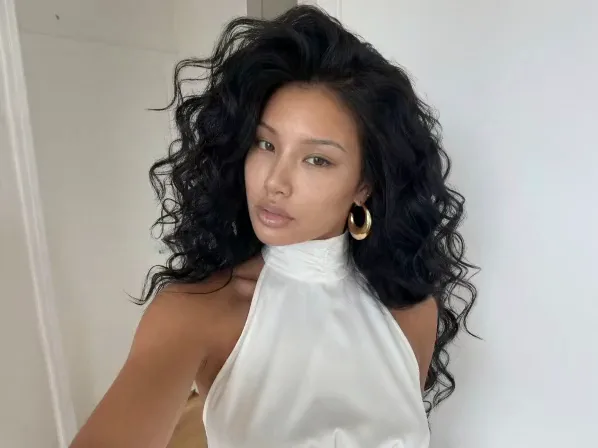
Enhance your natural beauty with the most versatile makeup filter app around. Skipped your morning routine? Smooth your skin, refine your features, and apply on-trend makeup in an instant. More than an overlay, it is a makeover studio that respects your facial structure.
Explore more Facelab tools
AI Make Up Editor
Apply virtual lipstick, eyeshadow, and blush instantly.
Open Tool →AI Hairstyle
Try any hairstyle and color — from subtle to bold.
Open Tool →Object Remover
Erase unwanted objects from photos with AI precision.
Open Tool →Photo Expander
Expand any photo with AI-generated edges in seconds.
Open Tool →Background Remover
Remove any background in seconds with AI precision.
Open Tool →Watermark Remover
Erase watermarks and logos from any image instantly.
Open Tool →AI LinkedIn Headshot
Generate professional headshots from any selfie.
Open Tool →Clothes AI Editor
Swap outfits and try new styles with AI.
Open Tool →AI Teeth Whitening
Brighten your smile with realistic whitening in one tap.
Open Tool →Eye Color AI Editor
Change eye color naturally — any shade, any photo.
Open Tool →AI Shadow Remover
Remove harsh shadows from photos automatically.
Open Tool →Image Upscaler
Enlarge photos up to 4× without losing quality.
Open Tool →Body Editor
Slim, reshape, or adjust body proportions with AI tools.
Open Tool →Skin Retouch
Smooth skin, reduce blemishes, perfect your complexion.
Open Tool →Face Shape Editor
Subtly reshape facial features with natural precision.
Open Tool →AI Profile Photo Editor
Turn any selfie into a stunning profile picture.
Open Tool →Resizing Image
Resize photos to any size without quality loss.
Open Tool →Instagram AI Photo Editor
Edit photos for Instagram with one tap AI presets.
Open Tool →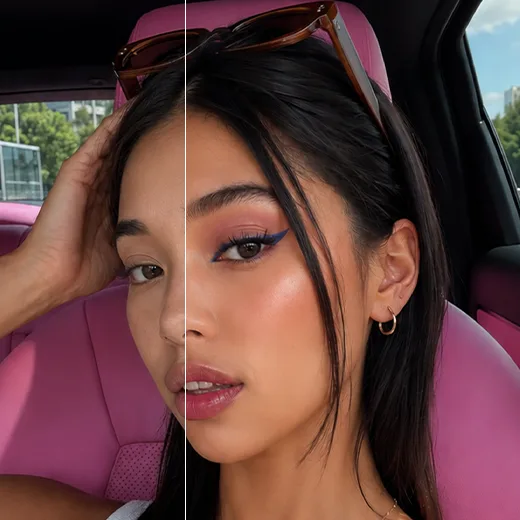
AI Face Makeup: Instant Beauty in Just One Tap
Facelab's AI Beauty adds a polished look in one tap. This app for makeup on photos smooths your skin, brightens your complexion, and refines features while keeping everything natural. We preserve texture, so you never look over-edited, only a healthy, radiant glow.
The Hottest Styles in our Makeup Filter App
Trend-based presets give you a ready look in seconds. As a leading AI makeup editor, we keep the library fresh, from no-makeup finishes to red-carpet glam. With our smart AI makeup filter, test bold lipstick, sharp eyeliner, or soft blush to match your mood, all blended naturally into your features.
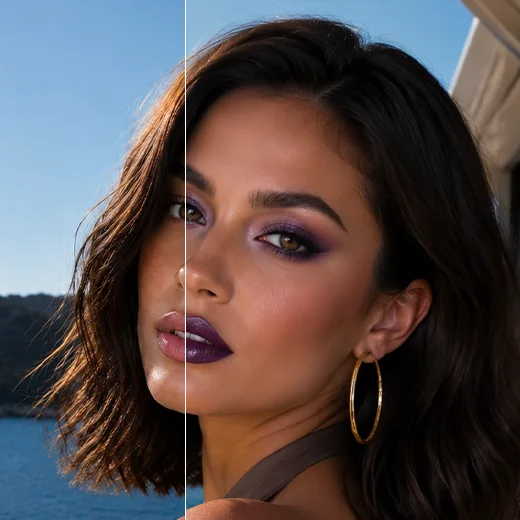
Custom Looks for Everyone: An App for Makeup on Photos
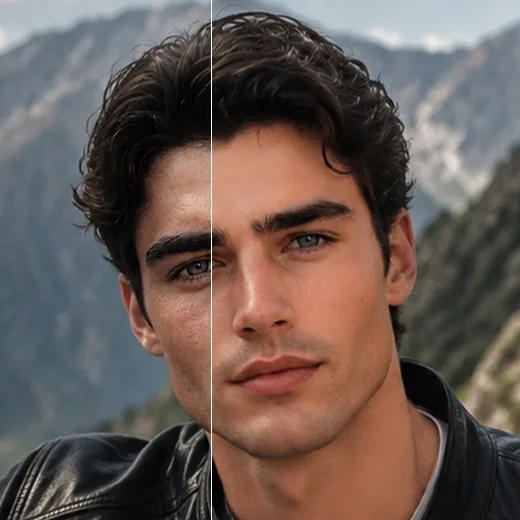
AI Beauty is not for one audience. A men's pack adds subtle grooming and skin-perfecting effects. Our AI face makeup algorithms read diverse facial structures and keep edits subtle, ideal for polishing a LinkedIn headshot or a dating profile.
Stand out with Facelab.
Facelab is the quick and easy photo editing app to make impactful social posts, product images, and creative visuals. Create one-of-a-kind content fast — regardless of skill level — with powerful AI tools, an intuitive editor, and professional results ready to share in seconds.
What our users say
“I used to spend 20 minutes editing photos by hand. Now it takes 5 seconds. The results look more polished too.”
“Perfect for my e-commerce store. My listings look so much more professional now — and it's instant.”
“I tried every free tool out there. Facelab handles edge cases — hair, fine details — better than anything else.”
“I shoot products on my kitchen table. Facelab makes them look like a proper studio shot every time.”
“Used to outsource at $5 a photo. Now it's instant and free. The quality is identical — clients can't tell.”
“I edit photos for marketing assets in minutes. It completely changed how fast I can ship creative.”


Do more with the Facelab app
Get 25+ AI-powered editing tools, filters, and creative effects — free on iOS and Android.


Facelab AI Makeup Editor: Frequently Asked Questions
Learn how to enhance your natural beauty instantly with our AI Makeup Editor. Browse our FAQ to discover how our versatile makeup filter app allows you to apply trendy styles, smooth skin, and access dedicated men's grooming tools—all with one tap and no downloads.
How does the AI makeup editor apply realistic makeup to my photos?
Facelab uses advanced AI algorithms that act as a digital makeover studio. Instead of just applying a simple overlay, our AI makeup editor analyzes your unique facial structure to smoothly apply trendy makeup styles and refine your features, ensuring a natural and professional-grade result.
Do I need to download any software to use the makeup filter app?
No, you don't need to download anything or install plugins. Facelab's AI face makeup tools work entirely in your browser. Just drag and drop your photo, apply the desired makeup filter in one tap, and download the edited image in seconds.
Can men use the app for makeup on photos for subtle retouching?
Yes! Facelab includes a dedicated men's beauty pack designed for subtle grooming enhancements. Our AI recognizes diverse facial structures to provide natural-looking skin-perfecting effects, making it ideal for polishing LinkedIn headshots or updating dating profiles while maintaining a masculine appearance.
Is there a limit to how many trendy makeup looks I can try?
There is no limit to how many photos you can experiment with. You can try various trendy makeup looks, smooth skin, and test different aesthetics without signing up, and there are no watermarks on your preview images.
Can the AI beauty tools be used for professional product shots or just selfies?
While perfect for selfies, Facelab's AI beauty features deliver studio-grade output suitable for professional use as well. Whether you are refining a casual portrait, creating impactful social media posts, or polishing models in product shots, our intuitive editor guarantees professional clarity without any learning curve.
How does the AI Beauty tool in Facelab enhance photos?
Facelab's AI Beauty tool utilizes advanced facial mapping algorithms to automatically detect and refine facial features. Unlike standard filters that simply blur the image, the AI Beauty engine analyzes skin texture to remove imperfections while preserving natural pores and details. This allows for professional-grade retouching, skin smoothing, and brightening in a single tap.
Can I add makeup to my photo if I'm not wearing any?
Yes, the AI Beauty feature in Facelab functions as a realistic virtual try-on. It applies digital makeup presets—ranging from a subtle 'no-makeup' glow to bold, artistic styles—directly onto your photo. Facelab's AI ensures the digital makeup blends seamlessly with your skin tone and lighting for a hyper-realistic finish.
Does Facelab have photo retouching tools specifically for men?
Absolutely. Facelab's AI Beauty tool includes a dedicated Men's Grooming pack designed to enhance masculine features without adding makeup. These specific Facelab AI algorithms focus on skin refinement, beard definition, and jawline contouring. The goal is to produce a polished, clean look that retains the subject's rugged and natural character.
How do I avoid the 'fake' or 'plastic' look when retouching?
The key to natural editing is Facelab AI Beauty's adjustable intensity control. The AI is calibrated to prioritize skin texture preservation to avoid the plastic doll effect. Additionally, users can utilize the Facelab opacity slider to adjust the strength of any filter or effect, ensuring the final image looks authentic.
Are the AI Beauty filters in Facelab free to use?
While Facelab offers essential retouching tools for free, exclusive AI Beauty Premium presets, advanced makeup collections, and high-resolution export features are available via subscription. This tier unlocks the full power of Facelab's generative AI engine for unlimited creativity.
Try Facelab Now!
Virtual makeup, skin retouching, and AI enhancement — free to try right now.
Free to download · No commitment required